
For seamstresses, costume studios & sewing businesses
Run your sewing studio in one place, projects, rentals, clients, and payments.
Sewing IQ replaces scattered spreadsheets, photos in text threads, and paper measurement cards so you can spend more time at the machine.
$19.99/mo after trial · No card required · Cancel anytime
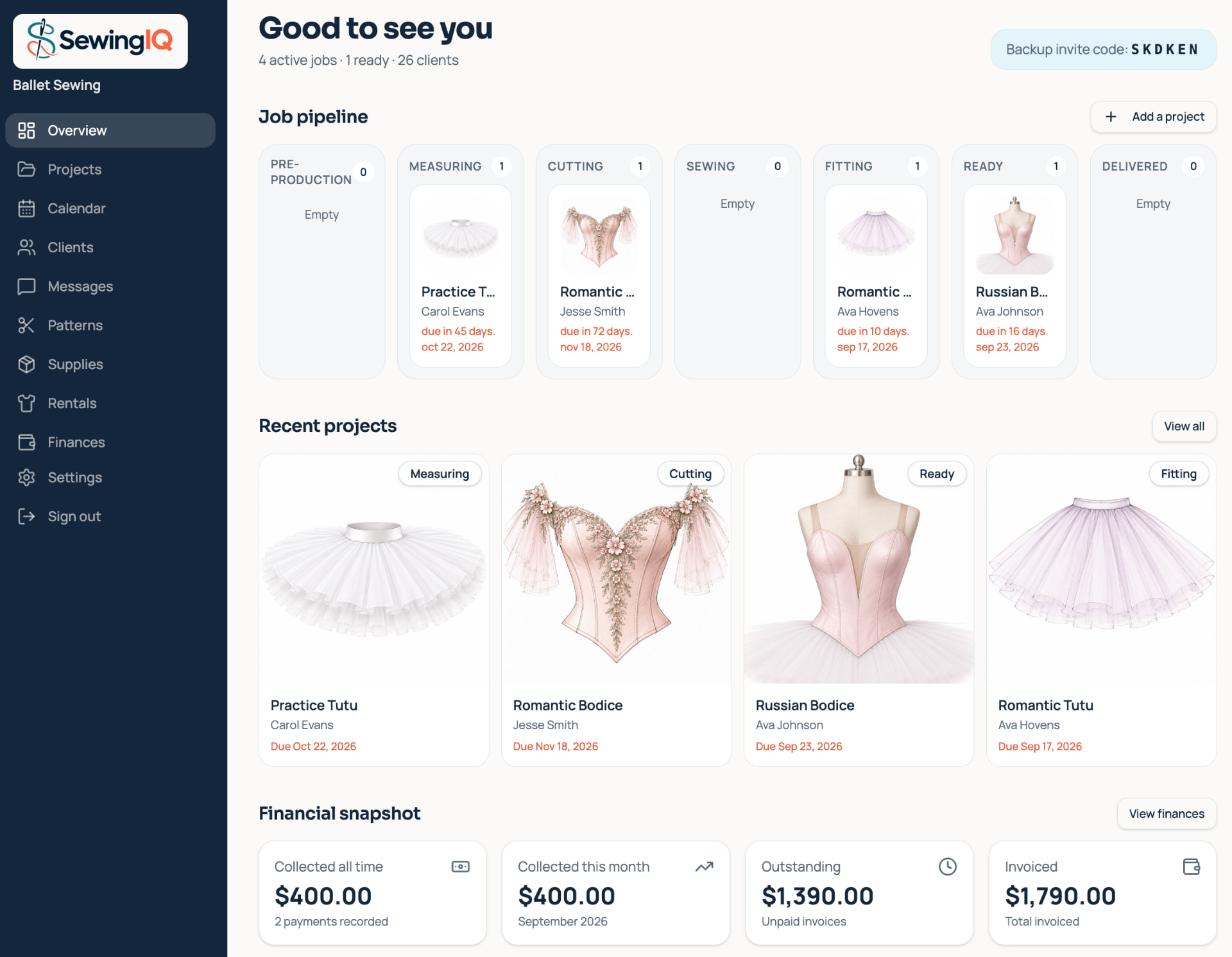
Everything your studio needs
Built around how a sewing business actually runs
Project pipeline
Track every garment from first quote to final delivery. Each project moves through clear stages — pre-production, measuring, cutting, sewing, fitting, ready, and delivered — so you always know what’s on the machine and what’s up next.
- Visual status pipeline with due-date alerts
- Deposit and balance tracking per project
- Invoices, notes, and files tied to one record
Each project, all in one place
Open any project and see everything that matters: details, measurements, due dates, assigned pattern, messages, payments, files, and a full history timeline — no more hunting across apps or notebooks.
- Project details, scope, and status at a glance
- Built-in message thread between studio and client
- Deposit, invoice total, balance due, and payment history
Client portal
Give clients a private, branded space where they can follow their projects, view progress photos, send messages, and see invoices — all organized by job instead of buried in texts.
- One portal per client with project-level threads
- Progress galleries with comments and uploads
- Payment and measurement history always visible
Costume rentals
List rental inventory with photos, sizes, colors, and rates, then book items by the day or week. Blackout dates stop double-bookings and rental invoices are calculated automatically.
- Inventory cards with images and rates
- Automatic conflict blocking on the calendar
- Rental invoices generated from booking dates
Finances & reporting
See exactly where your money stands. Collected, outstanding, and invoiced totals are updated as you record payments, so you know who has paid and what’s still on the table.
- Collected, outstanding, and invoiced summaries
- Open-invoice drill-down by project
- Date filters for month-to-date and all-time views
Studio calendar
Project due dates, fittings, rental pickups, and returns all land on one calendar. Color-coded event types make it easy to see what kind of day is ahead at a glance.
- Fittings, due dates, pickups, and returns in one view
- Color-coded event types by category
- Quick links from events to projects or rentals
Patterns & supplies
Build a searchable library of patterns, fabrics, notions, suppliers, and colors. Link supplies directly to projects so you never wonder which fabric went with which gown.
- Patterns organized by category, size, and type
- Supply inventory with supplier and color notes
- Link any supply directly to a project record
Projects & invoices
Build quotes, collect deposits, and track the full payment lifecycle for every project. Invoices include line items, tax, partial payments, and deposit status — all linked to the project record.
- Deposits, line items, sales tax, and payments all in one place.
- PDF invoices you can email or print.
- Status badges keep the whole pipeline readable at a glance.
Business testimonials
Loved by sewing studios
Hear how other business owners use Sewing IQ to organize clients, projects, rentals, and payments.
“Sewing IQ finally gave us one place for measurements, photos, and due dates. We stopped losing client details in text threads and our whole team knows what's on the machine each morning.”
“The client portal alone saved us hours each week. Customers see their project status and progress photos without asking, and they pay invoices right from their phone.”
“We run a small rental library and a busy alteration schedule. Having rentals, fittings, and project deadlines on one calendar keeps us from double-booking and helps us plan fabric orders ahead.”
The client portal
Your clients follow along — without texting you
Every client gets their own private portal. They see live status, photos, and payment history for their projects, and message you in organized threads — one per project, per business.
Live project status
Clients watch their piece move from measuring to ready, with due and fitting dates up front.
Progress gallery
Share photos as the garment comes together. Clients can comment on every image.
Organized chats
Threads per project and per business — no more lost texts or mixed-up conversations.
Payment visibility
Invoices, deposit status, and payment history are always visible to the client.
How it works
Up and running in an afternoon
Set up your studio
Add your business info, set your tax rate, and invite team members if you have them.
Add clients & inventory
Record measurements, create projects, list rental items, and build your pattern library.
Invite clients to follow along
Clients see their portal, you see payments, and everyone stays on the same page.
Pricing
Simple plans.
Run your whole studio on Sewing IQ. Start with 21 free days — no card required.
Solo Plan
Unlimited access during your trial · Cancel anytime
- Unlimited clients, projects, and measurements
- Household member profiles with linked measurements
- Costume rental inventory with blackout-date calendar
- Rental invoices, payments, and status history
- Studio calendar with fittings, due dates, pickups & returns
- Pattern & supply library with colors, suppliers, and file attachments
- Project invoices with line items, deposits, sales tax, and PDF downloads
- Finance dashboard with collected, outstanding, and invoiced totals
- Private client portal with progress galleries and project chat
- Email invitations and client account access
No card required to start
Small Business Plan
Text messaging with your clients · Cancel anytime
- Everything in the Solo Plan
- Text clients right from your Messages page
- Clients can reply by text and you see it in the app
- 500 texts sent and received every month
- Clients opt in — and can reply STOP at any time
Upgrade any time from your settings
Studio Plan
Texting plus logins for your team · Cancel anytime
- Everything in the Small Business Plan
- Invite your team to their own logins
- Choose view-only or full-edit access for each person
- Assign projects to a staff member
- Filter your project list by who's working on it
- Monitor rentals, including who created each one
- View project history logs and payment history by staff member
Invite-only staff accounts
Ready to tidy up your studio?
Set up your business, invite your first client, and never dig through a notebook for a measurement again.
Start 21-day free trial